
Common Sense Media
Common Sense MediaParenting
4.6106.00 Reviews
- Version
- 1.15.0
- Installs
- 100.00K
- Age Rating
- Everyone
Screenshots


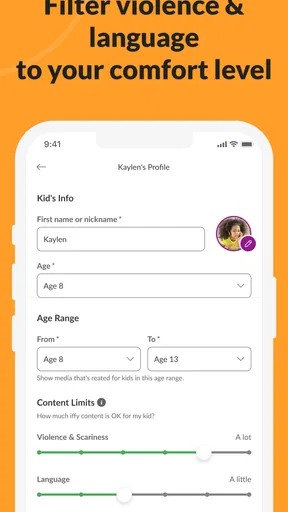

Our Review of Common Sense Media
 Analysis by Appyee
Choosing something to watch with children can turn a relaxed evening into a string of quick searches: Is the story suitable for their age? Is there frightening content, strong language, or a theme they may not be ready for? I find Common Sense Media most useful as a decision aid for those moments, rather than as a rulebook. It gives families a place to look for context before pressing play, while leaving the final call to the parent who knows the child.
What kind of trust can a parent place in a review?
Common Sense Media is a free parenting app from Common Sense Media, and its focus is assessing entertainment with families in mind. That focus matters: a review can help me notice subjects I might not think to check, but it cannot decide what will work for every household. Children of the same age can respond very differently to suspense, conflict, or a sensitive topic, so I treat age guidance as a starting point for a conversation, not a guarantee.
The app has an average rating of 4.6 from around 1,800 ratings, and it has been installed over 100,000 times. Those figures suggest that many people find it worth trying, but popularity is not the same as a personal fit. I would judge its usefulness by whether the review answers the question I actually have: not simply “Is this suitable?” but “What might my child notice, and how can I prepare for that?”
Use reviews as a family decision tool
A practical way to use the app is to check a title before a family outing or streaming session, then focus on the details that matter to your child. If frightening scenes are the main concern, look for that context first; if you are deciding whether a story offers something worth discussing, pay attention to its messages and role models. This keeps the search purposeful instead of turning every decision into a full research project.
For example, if a child hears friends talking about a new film, I would search for it before agreeing to a weekend viewing. I could use the review to identify possible concerns, then explain my decision in plain language: perhaps the story seems fine, but one element deserves a conversation, or perhaps we should choose something else for now. The useful outcome is not just a yes or no. It is a decision that feels considered and gives the child a reason they can understand.
Controls, privacy, and the moments to pause
I would be careful not to confuse a media guide with a parental-control tool. Its value is in helping a family evaluate entertainment; it does not replace the settings on a streaming service, device, or game platform. If you want to restrict what a child can open, you still need to use the controls provided by the service or device they use. Keeping those jobs separate makes the app’s role clearer and avoids expecting a review to block access.
When an app is used around children, I also think about what I am sharing and which choices are visible. I would search for a title without entering personal details that are not needed for the decision, and I would check the app’s current permission and privacy prompts during setup rather than assume how it handles information. The listing identifies the audience rating as Everyone, but that is not a substitute for reviewing the choices shown on your own device.
Who will get the most from it?
I think this is a good fit for parents and caregivers who want a quick second opinion before choosing a movie or TV show, especially when a child is at an age where content concerns are changing. It can also help adults compare what a title contains with their own family’s boundaries, rather than relying only on a trailer or a friend’s recommendation. The app is free to download, though in-app purchases are available, priced from $3.99 to $39.99 per item, so I would check the purchase prompts and decide whether any paid option is relevant before proceeding.
It is less suited to someone looking for a control dashboard that manages screen time, filters every service, or blocks unsuitable titles. It may also feel unnecessary if you already have a trusted way to assess the shows your family watches and rarely need outside guidance. For a one-off choice, a focused search can be more practical than browsing broadly; for a family that often weighs age suitability and content themes, having reviews in one place can save effort.
Getting Started with Common Sense Media
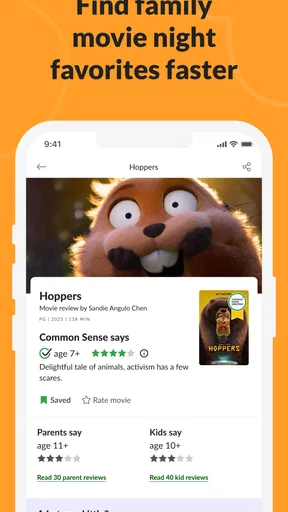
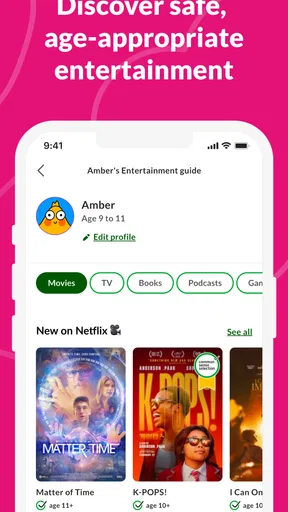
First off, let's chat about how easy it is to get started. Once you download the app, you’re greeted with a clean and intuitive interface. Seriously, it’s as straightforward as pie. You don’t need to be a tech wizard to navigate through its options. You can quickly search for movies, games, books, and TV shows to see what’s suitable for your kids. The app provides age recommendations, which are lifesavers when you’re in doubt about what’s appropriate.
Features That Stand Out
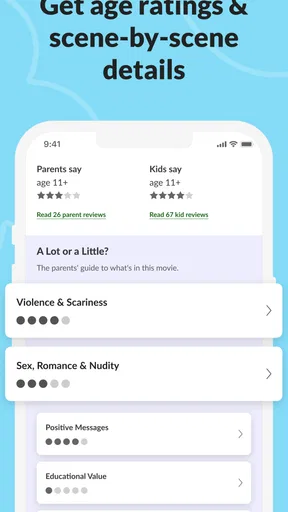
Now, let’s dig into what makes Common Sense Media a must-have. One of my favorite features is the detailed reviews. These aren’t just brief overviews; they give you the nitty-gritty on everything from language to educational value. It’s like having a personal guide who’s done all the homework for you.
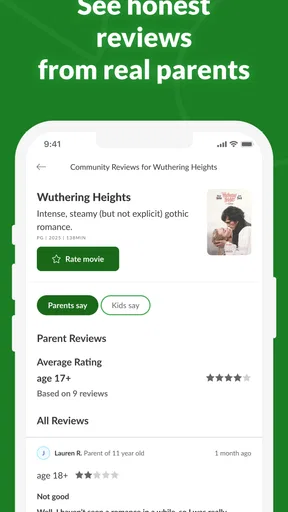
Another standout feature is the parent and kid reviews. You get to see what other families think, which can be super helpful. It’s like having a community of parents on speed dial. Plus, the app doesn’t just focus on the negative aspects; it highlights positive messages and role models too, which I find refreshing.
Usability and Design
The design is sleek and the navigation is a breeze. You won’t find any clutter here, just straightforward options that get you to the information you need without any fuss. The app is also very responsive, with minimal load times, which is a bonus when you’re in a hurry to make a decision.
One thing worth mentioning is the search functionality. It’s robust and helps you find exactly what you’re looking for, be it the latest blockbuster or an educational game. The filters allow you to narrow down options based on age, type, or even specific content concerns.
Make the guidance fit your child
I get the most from the reviews when I use them as a checklist for a particular child, rather than treating an age recommendation as a universal verdict. A younger sibling may be unsettled by something an older child finds manageable; another child may be more concerned about language than suspense. Before searching, I decide which issue matters most, then read for that point. It makes the result easier to discuss and keeps the app from turning into a simple pass-or-fail test.
There is also a useful distinction between reading a review alone and reading it with a child. For a younger child, I might use the information privately to choose what to watch. With an older child, I could bring up a specific theme and ask what they think, without treating the review as the final word. That approach makes the resource more valuable than a quick screening decision: it can help a family explain boundaries and build media judgement over time.
When a title is unfamiliar, I would avoid relying on a single signal such as its age recommendation or another family’s short reaction. I would compare the review’s content notes with the child’s sensitivities and the setting in which we plan to watch. A tense scene may be easier to handle when an adult is present than during solo viewing before bed. That is a practical trade-off the app cannot make on a parent’s behalf, but its detail can help make the choice more deliberate.
Where it fits among other options
The usual alternatives are a streaming service’s own age labels, a quick web search, or asking another parent. Each can be enough for a straightforward choice, and platform labels are convenient when I am already browsing a catalogue. The advantage here is having reviews aimed at family decisions, including discussion of content and positive themes; the trade-off is that I still need to interpret that guidance for my household. A general search can turn up scattered opinions, while a focused review may give me a more organized starting point.
I would not expect one source to cover every concern equally well. If my question is whether a specific service can prevent a child from opening a title, I would go to that service’s parental settings. If I want to know what a story contains before deciding whether to watch it together, this app is the more relevant tool. Using both for their separate purposes is more sensible than asking either one to do everything.
The app is listed as suitable for Everyone, and version 1.11.0 requires Android 7.0 or later. Those details are useful when deciding whether it can be installed on a device, but they do not tell me how a child will experience its reviews or what choices will appear during setup. I would still take a moment to read permission prompts and any purchase screen on the device itself, especially if a child might use the app without an adult nearby.
Why You’ll Love It
So, why should you give Common Sense Media a shot? If you’re like me, you value your time and want to make informed decisions without wading through endless pages of information. This app does the heavy lifting for you. It’s a reliable resource that keeps you in the loop about what’s trending and what’s worth skipping.
Moreover, it’s not just about protection; it’s about empowerment. The app helps you guide your kids through the digital landscape intelligently and safely, which is something every parent can appreciate.
A careful recommendation for family use
I would recommend it to a parent who regularly has to make quick choices across movies and television, or who wants more than a platform’s broad age label before introducing a title. It can also be handy when children make their own suggestions: checking first gives me a way to respond with reasons rather than an unexplained refusal. The strongest use is not constant monitoring, but targeted preparation for a specific viewing decision.
My main caution is about expectations. Reviews can inform a decision, but family standards are personal, and a rating or another household’s reaction cannot guarantee that a title will suit your child. Nor should the app be treated as a replacement for device restrictions, direct supervision, or a conversation about what a child has watched. If you keep those limits in mind, its guidance can be genuinely helpful without handing over the parent’s judgement to an app.
Final Thoughts
All in all, Common Sense Media is a gem for parents navigating the media jungle. It’s user-friendly, packed with relevant features, and genuinely feels like a community effort to make parenting a little less daunting. So, the next time you’re pondering over whether that new movie is kid-friendly or if that game is more than just fun, remember that this app is just a tap away. Trust me, you’re going to love it!
Verdict
Strengths of Common Sense Media
- User-friendly interface simplifies navigation.
- Extensive library of app and game reviews.
- Age-based recommendations for parents.
- Detailed content breakdowns for media.
- Trusted by educators and parents alike.
Limitations of Common Sense Media
- Limited non-English content available.
- Some categories lack in-depth reviews.
- Occasional ad interruptions.
- Requires account for personalized features.
- No offline access to reviews.
Similar Picks in This Category
View All
Family Space
Motorola Mobility LLC.3.9

شرطة الأطفال - مكالمة وهمية
Oub Apps4.1

Findmykids: Parental Control
LETEM LTD4.6

Pregnancy + | Tracker App
Philips Electronics UK Limited4.8

Policía de niños - para padres
Kids police4.7

Pregnancy App
Amila4.9
Frequently Asked Questions
What is Common Sense Media and what does it offer?
Common Sense Media is a platform that provides detailed reviews and ratings for movies, TV shows, apps, games, and books. It aims to help parents make informed decisions about the media their children consume, focusing on age-appropriateness and educational value. It also offers parenting advice and curated content recommendations.
Is Common Sense Media free to use, or are there any subscription fees?
Common Sense Media offers a wealth of information for free, including reviews and ratings. However, they also provide a membership option called Common Sense Plus, which offers additional features, such as personalized recommendations and an ad-free experience. This membership requires a subscription fee.
How does Common Sense Media determine age-appropriateness for content?
The platform employs a team of experienced reviewers who analyze content based on specific criteria like violence, language, educational value, and positive role models. They provide age-based recommendations to guide parents on what is suitable for their children, helping to ensure a safe and enriching media experience.
Can I contribute my own reviews or feedback on Common Sense Media?
Yes, Common Sense Media allows users to contribute their own reviews and ratings. This feature enables a diverse range of opinions and helps other users make informed decisions. However, all user-generated content is moderated to ensure it meets the platform’s guidelines and maintains a respectful community environment.
Does Common Sense Media offer any tools for managing screen time or media consumption?
While Common Sense Media primarily focuses on reviews and recommendations, it also provides resources and articles on how to manage screen time effectively. The platform offers tips and strategies for setting boundaries, encouraging balanced media usage, and fostering healthy digital habits in children.
